
PageIndex: A Structured Approach to RAG
Why PageIndex rocks

You may have experienced a similar scenario. You ask an AI assistant about something in a document, and it confidently gives you an answer that’s close, but wrong. The information it cites is sort of related to your question, but not quite what you asked for.
This isn’t a hallucination problem (though that is a common problem in itself). It’s actually a retrieval problem.
Retrieval-Augmented Generation (RAG) has become the standard way to help AI systems answer questions about specific documents. The traditional approach goes like this: chop documents into chunks (by some predetermined length), convert them to embeddings, throw them in a vector database, and hope semantic similarity finds the right context.
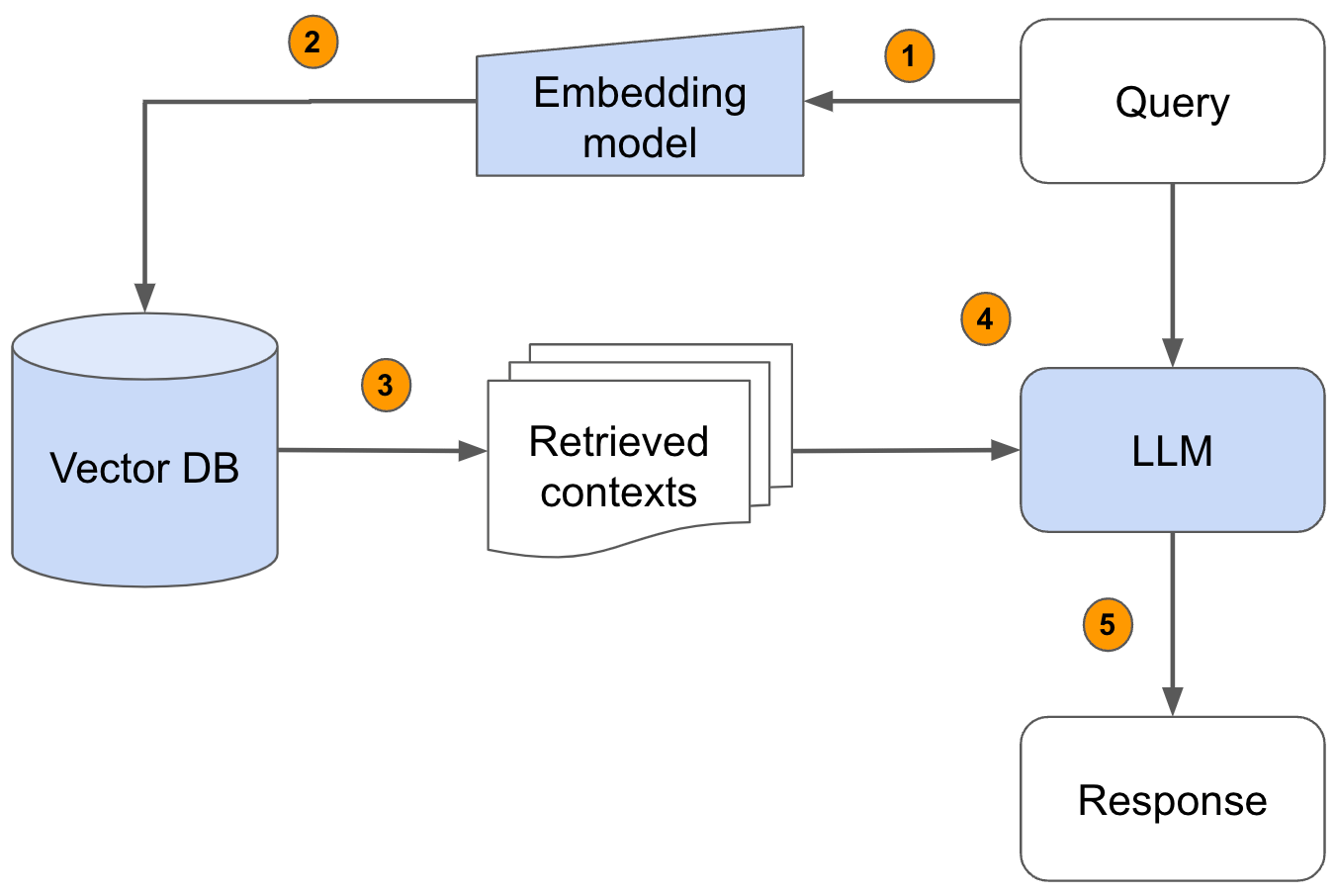
Here’s the fundamental flaw: similarity != relevance.
The Problem with Traditional RAG
Let’s say you’re building a system to answer questions about financial reports. A user asks: “What was the total value of deferred assets?”
Traditional RAG takes your question, converts it to an embedding (a list of numbers representing the semantic meaning), and searches for chunks with similar embeddings. It might retrieve passages containing words like “assets,” “value,” “total,” and “deferred.”
But what if the section that contains those words only mentions the change in deferred assets, not the total? What if the actual answer is in Appendix G, referenced by a phrase like “see Table 5.3 for details”?
The vector search found semantically similar text. You end up with the right-ish neighborhood but the wrong house. And because that context gets fed to the LLM, you get a confident, plausible-sounding answer that’s completely incorrect.
Traditional RAG systems treat every query as independent. They flatten your carefully structured documents into chunks, convert them to embeddings, and perform similarity searches. But what if the answer to your question doesn’t share semantic overlap with the query? What if understanding one section requires context from another?
Core Problem Statements
1. Query-knowledge mismatch: Queries express intent, not just content. When someone asks “What caused the revenue decline?”, they’re not looking for text that contains those exact words—they’re looking for analysis, explanations, maybe even charts or tables that never use the phrase “revenue decline.”
Queries express intent, not just content.
2. Everything looks similar in domain-specific documents: In a 200-page financial report, nearly every section contains words like “revenue,” “expenses,” “assets,” “growth,” and “fiscal year.” Semantic similarity doesn’t help when everything is semantically similar.
Similarity searches are good for narrative documents, not jargon-laden ones.
3. Chunking destroys structure: Documents are split into arbitrary 512 or 1000 token chunks. This cuts through sentences, splits tables across boundaries, separates headers from their content, and completely destroys the hierarchical organization that the authors carefully created.
4. No memory between queries: Each question is treated independently. If you ask “Tell me about Q3 revenue” and then ask “What about Q4?”, the retriever doesn’t know to look in the same section of the report.
5. References get lost: Documents constantly reference other sections: “see Appendix G,” “refer to Table 5.3,” “as discussed in Section 2.1.” These phrases have no semantic similarity to their referenced content, so vector search can’t follow them.
How Humans Actually Read
Think about how you find information in a book. You don’t read every page looking for semantic similarity to your question. The flow might look like this:
Check the table of contents to understand the document structure
Navigate to the relevant chapter based on your understanding of where that information would likely be
Skim section headers to narrow down further
Read the specific paragraphs that seemed most relevant
Follow cross-references when you encountered phrases like “see Section 5.2”
Build context by reading surrounding sections if needed
You respect the structure and hierarchy the author created for a reason, because it’s the most efficient way to traverse an organized document.
PageIndex: Be more human
An open-source approach called PageIndex takes this human-like navigation to an algorithmic level. No vector database, no embeddings, and no chunking documents into artificial segments.
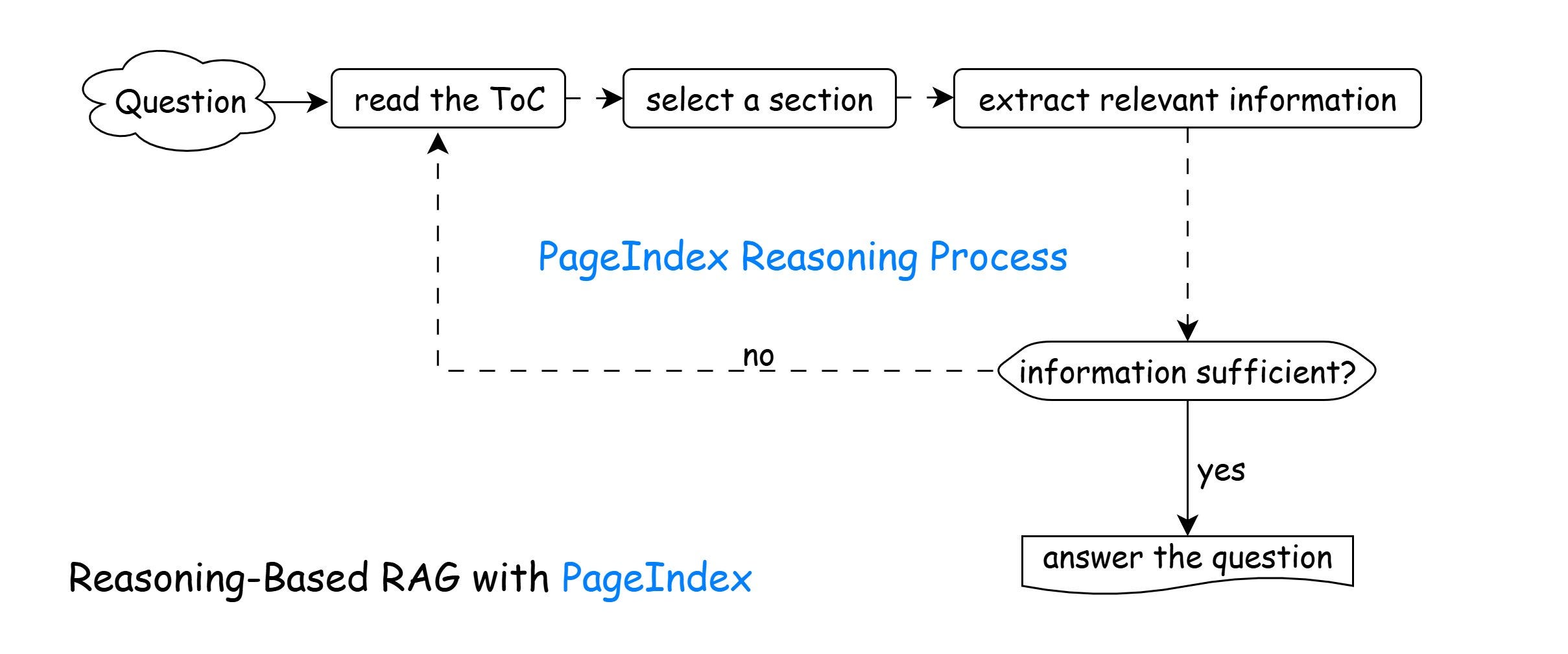
Instead, it builds a hierarchical tree structure from your documents, essentially creating a sophisticated table of contents, and uses reasoning to traverse it. The system understands document hierarchy: this section is about X, which contains subsections about Y and Z, which contain specific details about A, B, and C.
See an example of a tree here:
{
  "node_id": "0006",
  "title": "Financial Stability",
  "start_index": 21,
  "end_index": 22,
  "summary": "Discusses Federal Reserve monitoring of financial system risks...",
  "sub_nodes": [
    {
      "node_id": "0007",
      "title": "Monitoring Financial Vulnerabilities",
      "start_index": 22,
      "end_index": 28,
      "summary": "Details the Federal Reserve's framework for identifying systemic risks..."
    },
    {
      "node_id": "0008",
      "title": "Domestic and International Cooperation",
      "start_index": 28,
      "end_index": 31,
      "summary": "Describes coordination with other regulatory agencies..."
    }
  ]
}
When you ask a question, the AI reasons about where in this tree structure the answer is likely to live, then navigates there deliberately rather than hoping semantic similarity will surface the right chunk.
When you ask a question, the LLM doesn’t search for similar text. It reasons about where the answer is likely to be:
Reads the table of contents: “What sections exist in this document?”
Reasons about relevance: “The question asks about financial vulnerabilities, which would likely be in the ‘Financial Stability’ section under ‘Monitoring Financial Vulnerabilities’”
Navigates deliberately: Fetches that specific node
Extracts information: Reads the actual content from pages 22-28
Determines sufficiency: “Is this enough to answer? Or do I need to check related sections?”
Follows references: If the text says “see Appendix G,” the system can navigate there
Iterates if needed: Repeats until it has sufficient context
This is called an “in-context index” because the tree structure lives in the LLM’s context window, allowing it to reason over document structure in real-time.
Why This Matters
This approach acknowledges something important: documents have structure for a reason. Authors organize information hierarchically because related concepts belong together, and understanding often requires context from multiple levels of that hierarchy.
Some examples of documents that benefit from contextual, hierarchical, trees:
Financial Documents (SEC filings, earnings reports)
Legal Documents (lots of section references - “subject to terms in Section 3.1.7”)
Technical Documentation
Academic Research
By flattening documents into chunks and relying purely on vector similarity, traditional RAG destroys the structure of a document. Unfortunately, that’s like taking the skeleton out of a rabbit and saying, “hey, it’s still a rabbit!”
It’s a bit like tearing pages out of a book, numbering and shuffling them, and hoping you can reconstruct the author’s argument by finding pages with similar words.

Trade-offs
PageIndex isn’t magic. It has its own trade-offs. Building and maintaining document tree structures requires more upfront work than just chunking and embedding, and identifying relationships and generating summaries can be very compute-intensive. Reasoning through a tree adds latency compared to a simple vector lookup (turning a millisecond search into a 5s chain of thought process).
But for applications where accuracy matters more than speed, where documents have meaningful structure (not chat logs or social media content), and where queries require understanding relationships between concepts rather than just keyword matching, this approach offers something traditional RAG struggles to deliver: genuine understanding of how information is organized.
PageIndex also does not solve the problem of image understanding. From my own experience, some of the most valuable data in documents is embedded in charts, graphs, and diagrams. PageIndex would bring you to the place in the document to find your answers, but would defer to the LLM vision capabilities to understand and interpolate within a chart. If it can do a good job with that, you’ve got a wicked smart combo.
Even advanced systems like Claude Code have moved away from traditional vector-based RAG for code retrieval, achieving superior precision and speed without relying on vector databases. The same principle applies to documents: instead of depending on static embeddings and semantic similarity, LLMs can reason over structured representations.
The future of RAG might not be better embeddings or bigger vector databases. It might be systems that respect how humans actually structure and navigate information in the first place.
More info? Read the docs.